Join millions of users who are growing their wealth effortlessly with Acorns. Start investing spare change today and receive an exclusive $20 sign-up bonus!
Acorns Invest is a revolutionary app designed to simplify investing for everyone. By rounding up your everyday purchases and investing the spare change, Acorns makes it easy to grow your wealth without any hassle.
With features like automated portfolio management, educational resources, and a user-friendly interface, Acorns empowers you to take control of your financial future. Whether you’re a beginner or an experienced investor, Acorns provides the tools and support you need to succeed.
Getting Started with Acorns
How Acorns Works
1
Sign Up and Link Your Accounts
Create an Acorns account and securely link your bank accounts to start rounding up your purchases.
2
Round-Ups and Investments
Acorns automatically rounds up your daily purchases to the nearest dollar and invests the difference into a diversified portfolio.
3
Watch Your Wealth Grow
Monitor your investments and watch your savings grow over time. Acorns provides tools and insights to help you stay on track.
Watch our comprehensive video tutorial designed for beginners. This video will guide you through the basics of using the Acorns Invest app, from setting up your account to making your first investment. Perfect for those new to investing!
Watch our 24 Minute video that walks you through every step to make sure you are all set up and ready to start investing.
Sign up for Acorns Invest using our referral link and receive an exclusive $20 bonus. Don’t miss out on this limited-time offer to kickstart your investment journey!
Are you tired of settling for low interest rates on your money accounts? It’s time to unlock the full potential of your money with the M1 High-Yield Cash Account. This account offers an impressive limited-time offer of 4.50% APY, providing a significant boost to your financial goals.
Want to watch our review? Check our video here directly from YouTube [5 MINS]: M1 High-Yield Cash Account
https://youtu.be/YuAErBnB7vY
Unveiling the Power of M1 High-Yield Cash Account
In this comprehensive guide, we will delve into the details of the M1 High-Yield Cash Account, exploring its features, benefits, and how it can supercharge your money journey.
Security and Peace of Mind
Your financial security is paramount, and the M1 High-Yield Cash Account prioritizes it. With FDIC insurance up to a staggering $3,750,000, you can rest assured that your funds are protected far beyond the traditional $250,000 limit.
No Minimums, High Rewards
Unlike many high-yield accounts that require substantial deposits or even direct deposits, the M1 High-Yield Cash Account welcomes you with no minimum opening balance. This means you can start earning an impressive APY right away, regardless of the amount you initially put in.
Exclusive 5.50% APY Offer
For a limited time, you can access an exclusive 4.50% APY by using our affiliate link here. This boosted rate will apply for three months, giving your savings an extra push. Even after the promotion, your APY will remain at a competitive 4.00%.
Multiple Accounts, Diverse Goals
With the M1 High-Yield Cash Account, you can open up to five accounts (including one joint account), allowing you to tailor your money strategy to your specific needs. Whether you’re building an emergency fund, saving for a vacation, or planning for retirement, this account offers the flexibility to accommodate your diverse financial goals.
Track Your Progress, Celebrate Your Success
One of the most satisfying aspects of earning a high yield on your money is witnessing your money grow over time. The M1 High-Yield Cash Account makes it easy to track your interest earnings, both annually and over the lifetime of the account. This feature provides a tangible reminder of your financial achievements and motivates you to continue to deposit more into the account.
Effortless Account Management
Managing your finances should be simple and convenient. The M1 High-Yield Cash Account delivers on this promise with a user-friendly app and website. You can access statements, tax forms, and even your account and routing numbers with ease.
Grow Your Savings Automatically
To accelerate your money progress, you can set up direct deposit to automatically split your paycheck into your High-Yield Cash Account. This “set it and forget it” approach ensures that you consistently contribute to your account without even thinking about it.
Seamless Transfers and Withdrawals
Life is full of unexpected events, and having access to your money is crucial. The M1 High-Yield Cash Account offers unlimited transfers and withdrawals, providing peace of mind knowing that your funds are readily available if an emergency arises.
Integrated Financial Ecosystem
If you have other M1 accounts, such as M1 Invest, you can seamlessly transfer funds between them. This integration simplifies your financial management and allows you to optimize your investment strategies.
Smart Transfers for Automated Savings
With smart transfers, you can set rules for your transfers. For example, you could automatically transfer any interest earned above a certain threshold to another cash account or your M1 Invest account. This automation takes the hassle out of managing your savings and helps you reach your financial goals faster.
Minimal Fees, Maximum Value
For the first three months, you can enjoy the M1 High-Yield Cash Account completely free of charge. Afterward, a nominal fee of $3 per month applies, but this can be waived if you maintain over $10,000 in assets across your M1 accounts or have an active Personal Loan.
Start Earning More Today
Don’t let your money sit idle in a low-interest account. Take advantage of this limited-time offer and start earning 5.50% APY on your savings with the M1 High-Yield Cash Account. Click the link here to unlock this exclusive bonus and set yourself on the path to financial prosperity.
Stay Tuned for More M1 Insights
We’re passionate about empowering you with the tools and knowledge to achieve financial success. Be sure to check out our M1 Finance Investing review to keep learning right here.
Some of the links included in this post are affiliate links. Read my disclosure policy.
I’ve been using M1 Finance now for the past eight months and wanted to share my thoughts on the investing platform. I am not a financial advisor and these are just my options, so please make sure to talk to a cpa if needed.
Let’s start with some of the basics.
M1 Finance is a low-cost, self-directed online brokerage that offers low-cost trading through its website or mobile app. You are able to buy stocks, ETFs, and bonds. Its business model is similar to other recent investing platforms such as Webull and Robinhood, but with some unique benefits.
Pricing This is the biggest thing to note when it comes to using M1 Finance. It’s FREE to trade!!! It offers low-cost trading with a monthly platform fee of $3.00 which is waived for clients who have $10,000 or more in M1 assets at least one day during each billing cycle or an active Personal Loan. There is a 90-day grace period before this fee begins being charged.
I get really excited about that because I remember a time when buying or selling a stock was upwards of $9.95 a trade, YIKES! So this is a great value. Now I know what you might be thinking, how does M1 keep costs so low? How would M1 Finance make money? They make money a few different ways including their M1 Borrow features as well as directing order flow (making money by placing the orders) and lending shares to short-sellers. Effectively all these help make the basics of the platform low-cost for you.
Buying Shares This is a two-parter.
First is probably my favorite thing about M1 Finance and that is the ability to buy fractional shares! In case you’re unaware of what that is, it’s where you can buy smaller portions of a whole share.
Let me give you an example: I love Tesla and want to own a part of the company. On most other trading platforms in order to have ownership, you have to pay the full trading price if you want to buy a share. With M1 Finance you can buy small fractions of a share with Tesla. In my portfolio, you can see that I have 0.05569 (5%) of 1 share. By far one of my favorite features!
To some, this might not be that important, but I believe that getting started even with a small amount can make a big difference over time. M1 makes that easy because if you can only put in $20 every paycheck that $20 gets invested. On other platforms you would be limited in the stocks you can buy or you’d have to let the funds sit there until you had enough to purchase a full share.
The second thing with buying shares with M1 Finance is that there are two trading windows per day. The morning trade window begins around 9:30 ET and the afternoon window begins around 3:00 PM ET every day the NYSE market is open. Accounts with $25,000 or more in equity can participate in both trade windows in a single day, while other accounts can select which window they want to participate in. But for myself, I don’t mind this at all.
Pies This feature with M1 is a neat one. I haven’t seen it with other online investing platforms. Pies. Not the ones that you bake in the oven (although I could eat a pecan pie right about now). The pie is your overall portfolio and the funds you invest in are the slices of this pie.
And without trying to lose you, you can actually create pies within your main pie. Effectively, you can create sectors for the funds to be placed in. They can mimic the market sectors such as the energy sector, tech sector, communications sector, etc or make your own based on what companies you put in. In the photo below you can see my pies within the main pie.
I love this feature since I can group of stocks that I want together, the neat part is I also get to see how those stocks are performing as a group overall. It gives me some great insight into how a particular sector might be doing.
Account Types M1 has several options when it comes to account types. You can open up a regular taxable investment account, a joint investing account, a trust account, custodial account, and retirement (traditional, Roth or SEP IRA or rollover).
Getting started M1 offers low-cost investing with a monthly platform fee of $3.00 which is waived for clients who have $10,000 or more in M1 assets at least one day during each billing cycle or an active Personal Loan. There is a 90-day grace period for new users to try out the platform before the fee begins being charged. There is no minimum balance required to open an account, but you’ll need at least $100 for a brokerage account and $500 for a retirement account to start investing.
Once your initial amount is put in you can transfer whatever amount you want into the account. Although you will need a minimum of $10 for the money to be invested. Otherwise, anything less than $10 will sit in the cash balance. One downside to M1 in comparison to Robinhood is that you don’t get instant access to your funds when placing a deposit. Robinhood actually gives you access to upwards of $1,000 to invest with before the money is officially transferred, so you don’t miss any opportunities if the market was down.
Dividends Dividends. Probably one of my favorite words in the English language! Dividend payouts work a bit differently on M1 Finance than other investing platforms. Since M1 offers fractional shares, your dividends are paid out based on your overall shares, including the fractions. This means if a company pays out $0.10 a share and you own half of 1 share, you’ll get paid $0.05 in dividends.
M1 also gives you the opportunity to reinvest those dividends back into your portfolio with their auto-invest feature (also known as DRIP) which we’ll talk about in the next section. The one downside to some investors is that the reinvested dividends get returned to the whole portfolio and not necessarily back into the company that paid said dividends. This doesn’t bother me so much, although it would be nice if that would be an option.
Auto-Invest Auto-investing is when your account balance hits over $10 (default), that can be from deposits, dividends, or if you sold a stock. Now, this feature can either be turned off if you wanted or the dollar amount can be raised if you prefer.
Target Percentages When you create your pie (or pies within the main pie like me). You get to give a target percentage to each stock (or pie) to equal out to 100%. This means if you have 4 stocks or ETFs you can set each one to be 25% of your pie. You can also, if you wanted, set 2 funds at 40% each and the other 2 at 10% each. Whatever works best for you and your investing style. These targets will determine how much money goes into each fund.
Actual % vs Target % So what happens when a stock or an ETF starts doing really well and is above its target? A few things happen, the pie graph will look a bit funny, but second little to no money will most likely get deposited into that fund. And because a fund going over its target means another one is now under, the majority of the next deposited funds will be placed into this fund or funds.
I see this as a great thing personally because if a fund or a sector of funds is doing really well aside from the market just moving up, I tend not to invest more. But there is a solution if you did want your next deposit to go into that fund or set of funds. You can adjust the target %. Simple and easy.
Rebalancing *Talk to a financial advisor as mention at the beginning about this next part. This feature I stay away from personally. This is used when you either adjust to new target %’s or funds are off from their targets in general. You can hit the rebalance button to sell off funds that are above their target and buy into funds that are below. The reason I don’t do this is that it creates a taxable event since you’re buying and selling.
Website and App
I personally use both the website and app when checking my account. Both do a good job of navigating me through my account, although it’s slightly easier on the website. Creating multiple sectors (pies) is best done on the website.
User Interface/Research The user interface is fairly basic and easy to use. I think most novice investors can figure things out fairly quickly. For intermediate investors, such as myself there are a few things lacking such as the amount of detailed information about a particular stock or ETF. You can always head over to websites that offer more detailed information, so it’s not a make-or-break.
For beginner investors For those who may just be getting started with investing, M1 offers what they call “Model Portfolios”. These portfolios are curated with specific goals in mind. They have a general investing portfolio, plan for retirement portfolio, and even responsible investing portfolio to cater to many different investors to get you started.
Other features This review didn’t cover some of the other features on M1 such as the borrow and Cash Accounts features. Possibly in the future, I can talk about them, but for today I wanted to focus on the investing of M1.
Overall With everything we covered today, I hope I didn’t lose you along the way (You made the cut if you’re reading this part). I hope this was a simple and easy review. As mentioned I’ve been using M1 Finance for some time now, and there are many great features about the platform that really stand out to me in comparison to others in this area such as Webull and Robinhood (which I will be covering in future posts). The biggest features are that the platform offers low-cost trading, has fractional shares, and DRIP (the reinvesting of dividends). Some of the disadvantages of M1 Finance are the delay in access to your funds in comparison to Robinhood, the reinvesting of dividends only occurs when the cash balance is over $10, and information for each fund doesn’t go as in-depth.
Overall, I have been loving M1 Finance and it is the place where I am building up my dividend investing portfolio for the long haul.
We also have you covered with our full beginner’s video guide to setting up your M1 account. Watch our 1-Hour YouTube video here
Some of the links included in this post are affiliate links. Read my disclosure policy.
How to buy Dogecoin can be quite simple but there are a few things to be aware of in the process and we’ll go over that and also share a video on the easiest process below.
First and foremost always be cautious when doing any investing especially with crypto. Dogecoin can be a very risky investment but that doesn’t mean it can’t be rewarding. Just know that you can go from being up on the holding to a negative from your initial investment within a matter of moments.
Now that that’s out of the way let’s talk about how to buy Dogecoin. As mentioned earlier, I will have my YouTube video on the process down below if you’d prefer that method of learning.
There are a few platforms where you can currently buy Dogecoin and more are being added. The one we’ll be referencing today will be Robinhood, but another platform you can use is Binance and you can click here to check them out.
As we go through the process using Robinhood, you can create your free account here and get a free stock in the process. Robinhood is a free trading platform you can use to buy and sell securities. The current downside of using Robinhood is that you don’t get a wallet for Dogecoin (possibly coming in the future) this might not be a big deal if you just want to buy and sell it to try and make some money.
Once you’ve created a Robinhood account and deposit so money (you can add up to $1,000 instantly) then you can proceed through the following steps:
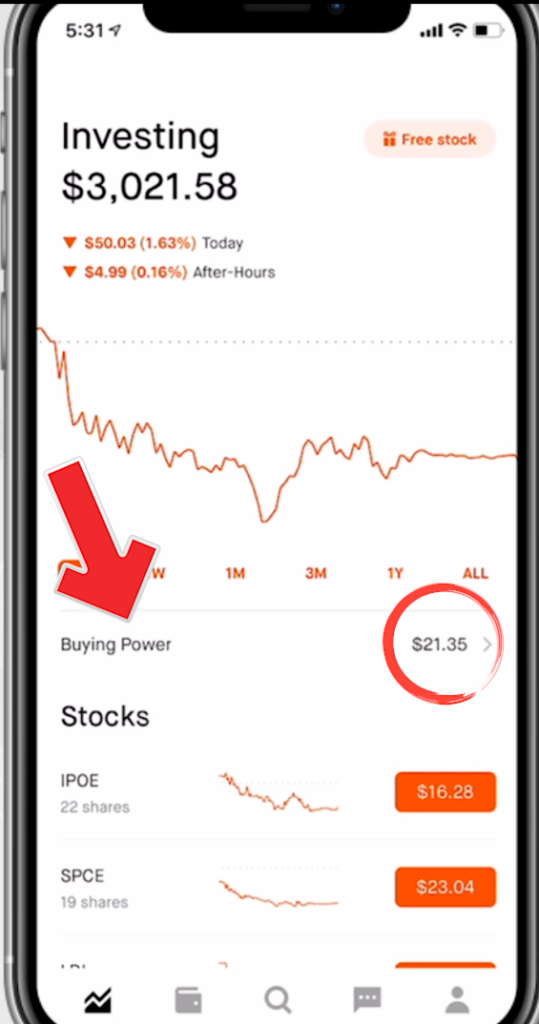
Step 1: Make sure you added a deposit. You’ll see this in your buying power as seen below.
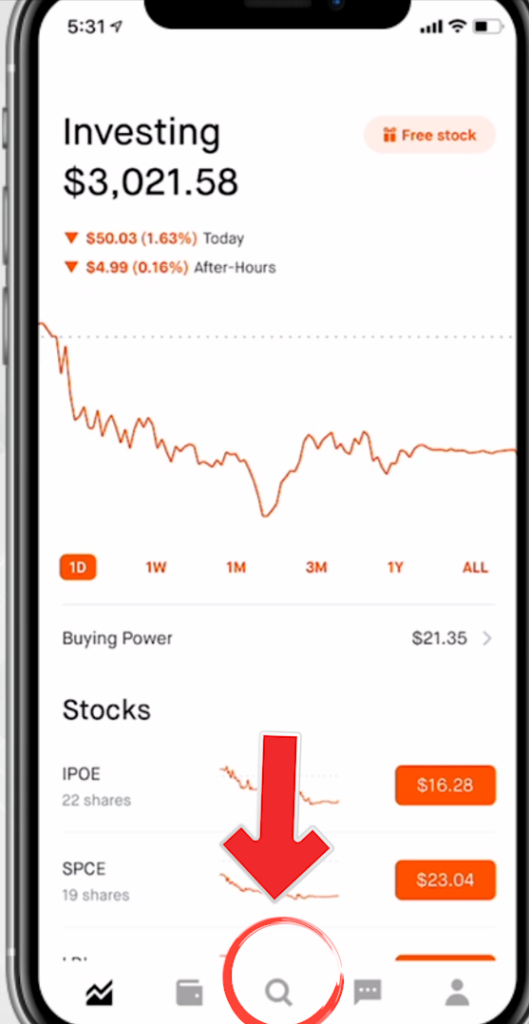
Step 2: Click the magnify glass (the bottom center icon) as seen below:
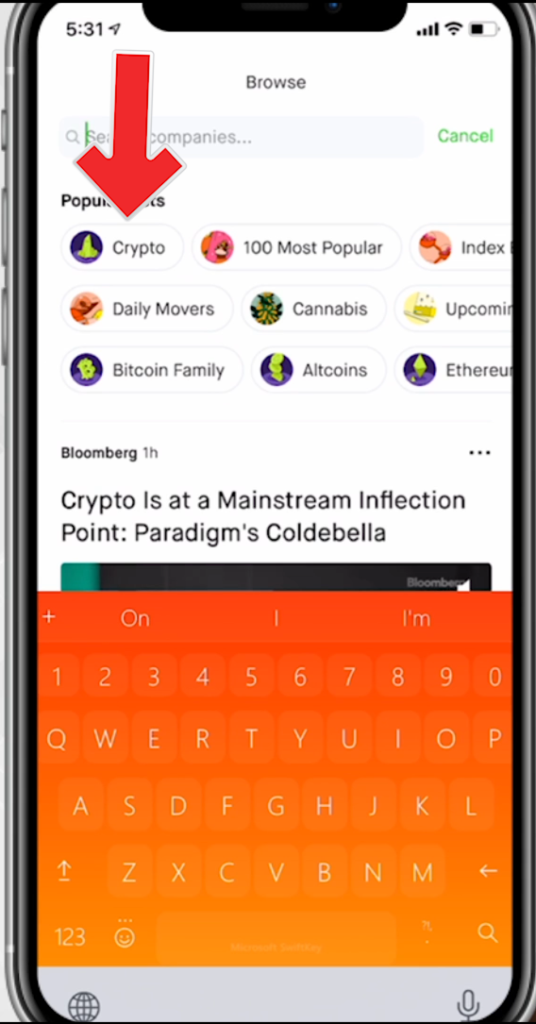
Step 3: Click on the Crypto icon or type in Dogecoin in the search bar at the top:
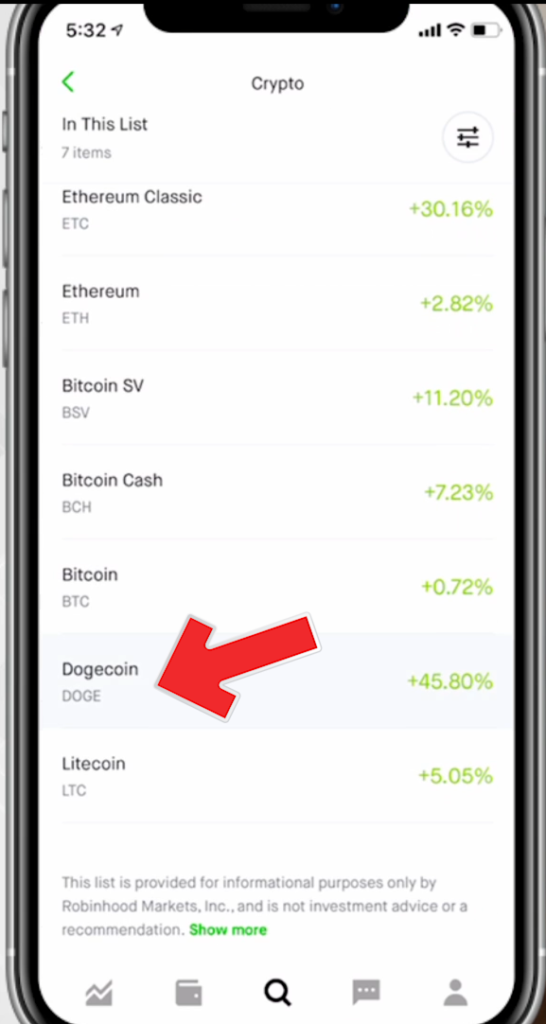
Step 4: Scroll down the crypto list as find “Dogecoin” and click on it:
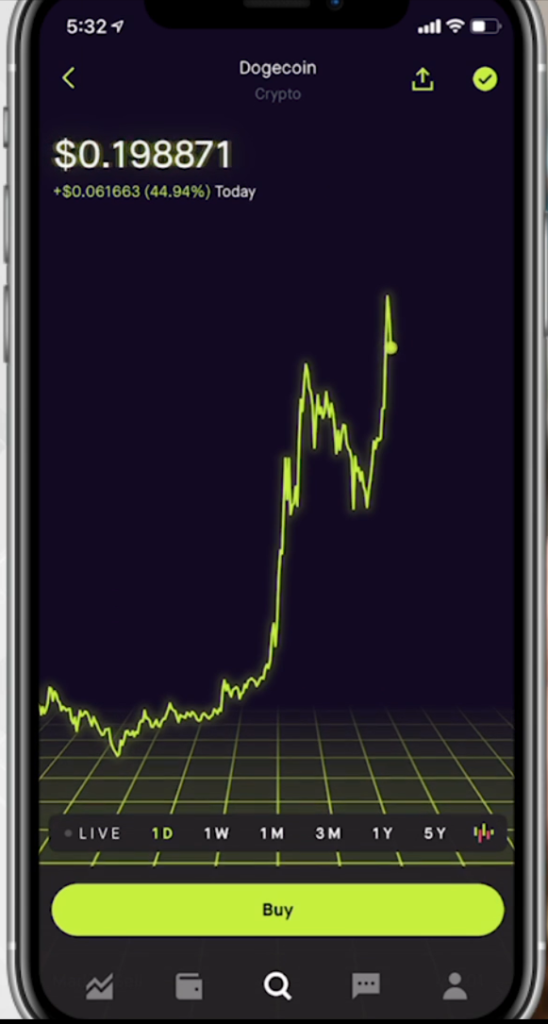
Step 5: On the Dogecoin page you’ll see “Buy” at the bottom click on it:
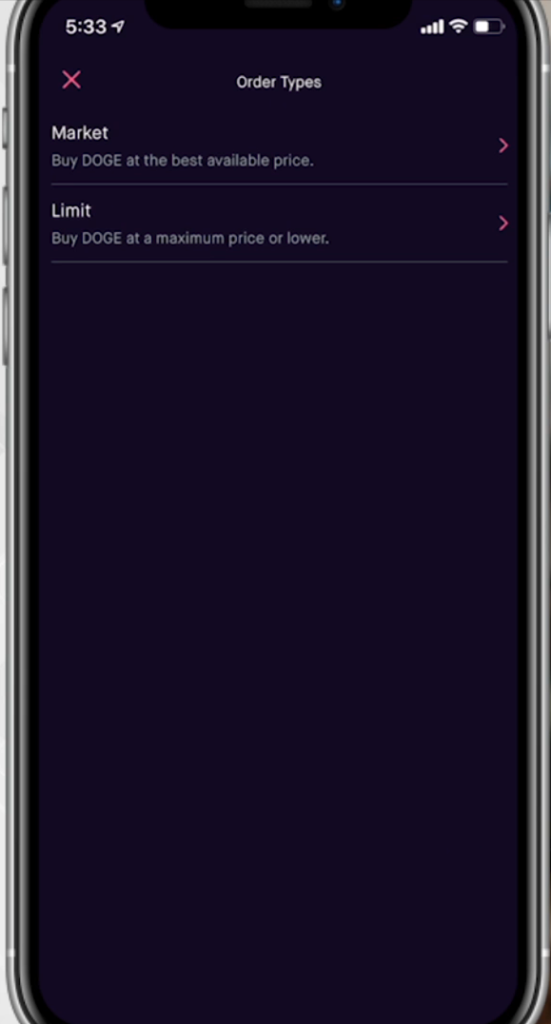
Step 6: Decide if you want to do a “market order” or “limit order” with Dogecoin by clicking the top right of the screen. Market order is buying in-real time vs limit order is buying at an exact price.
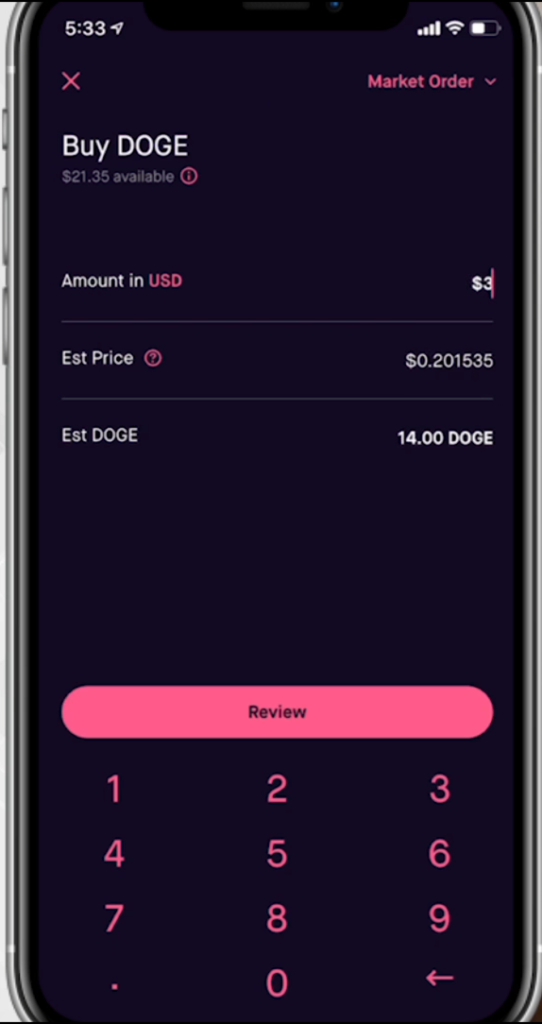
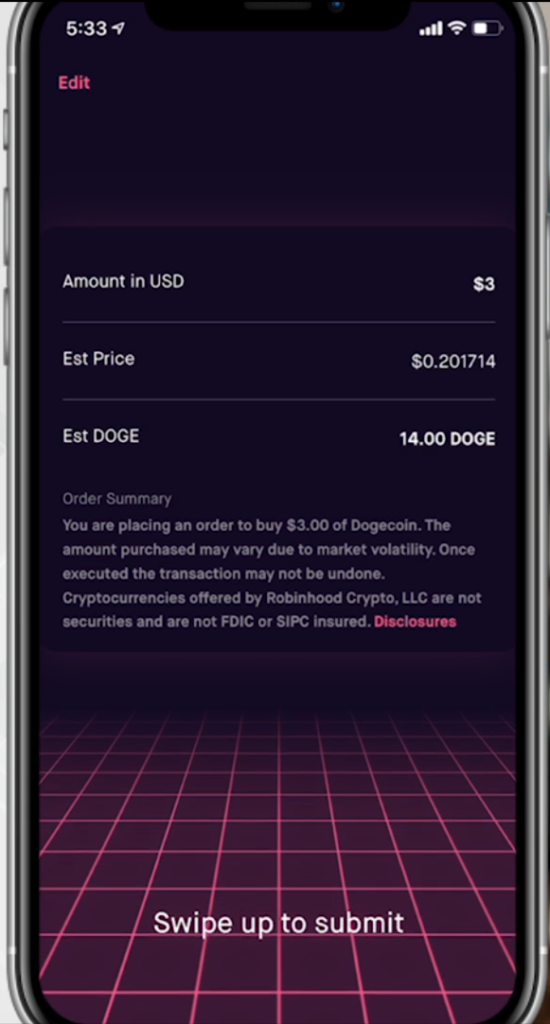
Step 7: Back on the buy screen you can put in however much up to your buying power to purchase shares of Dogecoin. Keep in mind fees and market changes and how this will affect how much you end up officially buying. In my example with the price, I am spending $3 and getting an estimated 14 Dogecoin. Then click “review”
Step 8: Order summary, double check everything looks good and then swipe up to complete your order (keep in mind that limit orders will only complete when it hits the price target).
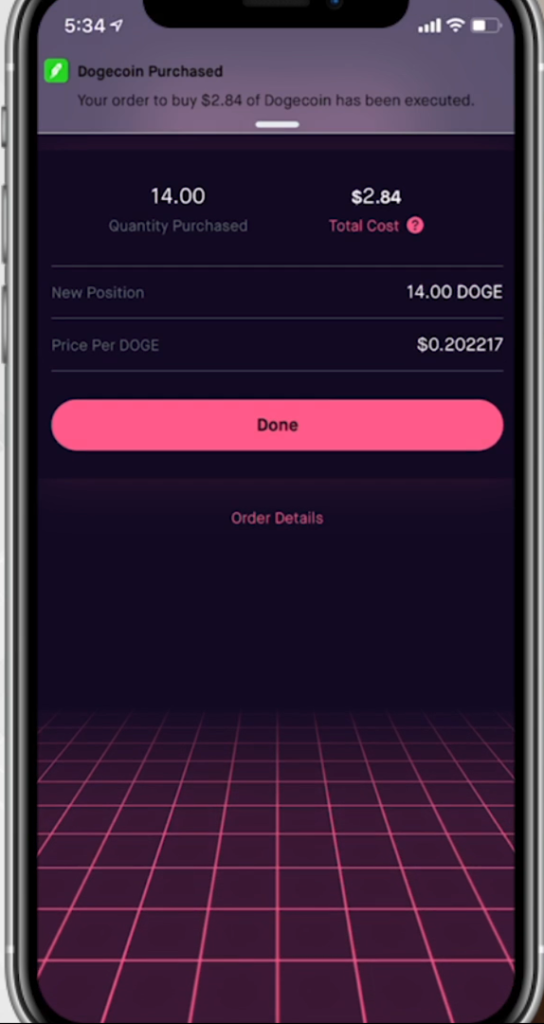
Step 9: You’re now an owner of some Dogecoin
That’s how to buy dogecoin! Don’t forget to click the link to sign up with Robinhood and get the free stock for doing so.
Some of the links included in this post are affiliate links. Read my disclosure policy.
Tax season is finally here, and with that – there are millions of people all across the nation who have a ton of questions. First off, should I do my taxes by myself, or do I need to go to an accountant and have them done professionally? Well, that would depend on your own individual circumstances. You would consider the complications of your tax preparation process, your filing status, your level of income, your risk for audit, etc. However, if you do choose to go the route of preparing and filing your income taxes on your own, then you have a few great options available to help you do it.
Remember, navigating your own personal finances can be tricky, so ensuring that you know what to expect when working with one of the three biggest tax filing software applications out there is key. In this short article, we are going to provide you with some insight into the differences between these three software applications. Let’s begin with TurboTax.
What’s The Deal With TurboTax?
There are a few tiered options including free filing* that provide you with some additional tools which might run you a bit more. Additionally, if you are self-employed as an independent contractor, a freelancer, or a consultant, you’ll be required to pay a fee of $120 upfront – which isn’t too hefty when you consider the complexities of your write-offs, deductions, and credits.
TurboTax also offers a wonderful 24/7 online and phone support hotline to help walk you through the steps of filing your taxes. If you have a question, you can receive instant support and assistance by whatever means necessary. So, even if it’s 11:30pm on April 14th (or thanks to the extension May 14th at 11:30pm) and you only have 30 minutes left to file your taxes before the IRS deadline, you can still receive support.
Let’s also not forget, TurboTax offers Live Tax Preparation for a fee, where a professional accountant will work with you to help you file your taxes. The software really is quite powerful, and it even offers an option for TurboTax Audit Defense to ensure that your filing is clean and free from potential errors. Check out TurboTax today (*for simple tax returns only” AND “not all taxpayers qualify)
Credit Karma
Now, what about Credit Karma? Well, they might not have as many features as, say, TurboTax or H&R Block, but they still provide you with all of the basics that you’ll need to address your personal finance structure and ensure a seamless tax filing process. Technically, the software is free to use if you’re going to earn a return from the IRS or your respective state, but there is a slight grey area there.
Additionally, their online help center is accessible, but a little more limited than the others. However, they do make it quite simple to track your refund after you’ve filed your taxes. This is a big plus because it helps you plan ahead for the future if you are planning to use that refund for something special.
Lastly, one of the biggest benefits with Credit Karma is that they offer a free Audit Defense process, provided by a third party. This helps to verify your tax filing to ensure that it is free of mistakes and potential audit risk. Check out Credit Karma today.
What About H&R Block?
As the cream of the crop, H&R Block really isn’t all that different from TurboTax – even if it has a stronger and more durable reputation. In fact, the two are nearly identical – although H&R Block’s paid tiered options might come at a cheaper price point.
For instance, the free version is enough to help you file your taxes from scratch. From there, tiered options begin at about $30, and increment increase to $50, and then $85 for self-employed. When compared with the prices that accountants are charging for tax preparation, this really is a steal.
From there, unlimited live chat and phone support is a big benefit. Not only does it ensure that you have assistance whenever you need it, but it gives you an opportunity to breeze through support with simple and easy answers.
Lastly, H&R Block offers you additional audit support for just $19.99. At the end of the day, H&R Block probably gives you the biggest bang for your buck, along with a great reputation as a company that is easy to deal with. Check out H&R Block today.
Rounding It All Out
As you can see, tax preparation always comes with a range of options – especially when you plan to do your taxes on your own. Each of these software applications bring a world of benefits designed to make the process easier for the everyday tax filer.